• Home
  • About
  • Advertise
  • Contact
  • Signup to receive updates
 Innovation | Startups | Funding | Tech Blog in Africa
NiRA Event
  • Home
  • Startups
  • Opportunities
  • Funding
  • Women Tech
  • Expert Column
  • Blockchain
No Result
View All Result
  • Home
  • Startups
  • Opportunities
  • Funding
  • Women Tech
  • Expert Column
  • Blockchain
No Result
View All Result
Innovation | Startups | Funding | Tech Blog in Africa
No Result
View All Result
Home General

“Screen Overlay Detected” Error: How to Fix It

by TechBuild.Africa
8 years ago
in General
Reading Time: 2 mins read
A A
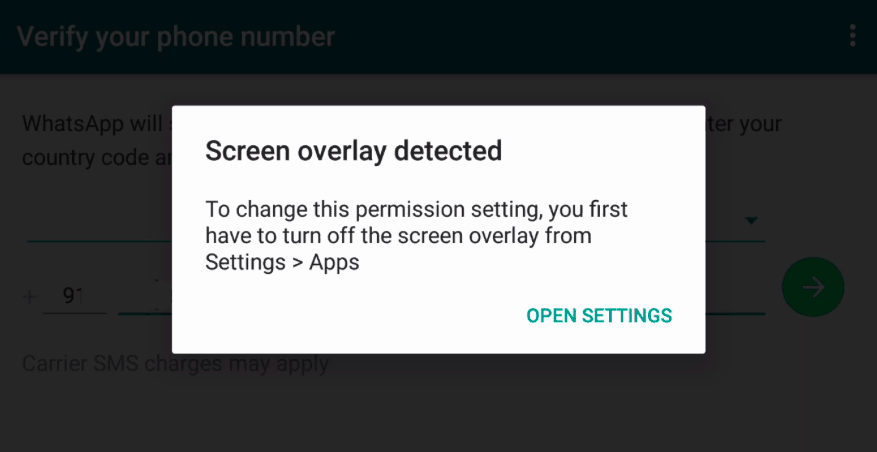
screen overlay detected

screen overlay detected

Share on FacebookShare on Twitter

RelatedPosts

Conversations 2026:Meet Meta Business Agent

Digital Encode Sounds Alarm Over Nigeria’s Rising Cybersecurity Failures

PayPal’s Account Crackdown in Kenya Exposes a Bigger Challenge for Cross-Border Payments

Anthropic Nears $1 Trillion Valuation After Massive Series H Raise

This happens when floats Apps (Apps that pops up or impose on other apps on your screen) are running, and then another of such Apps requests for permission. When such App requests for permission, they are interrupted, hence, the screen overlay error displays.

Not all Apps installed on your phones cause this error. However, you need to first identify the App causing screen overlay error and fix it up.

1. Identify, temporarily disable or hide and restart the permission requesting apps (Apps that draw over other Apps)

  • If you are using a Samsung phone, use this method.
  • Settings > Applications > App Manager > More > Apps that can appear top
  • Such apps that have permission to overlay on your screen.
  • If you are using other devices:
  • Go to Settings
  • Press the search icon (like a magnifying lens) and search for “Draw over other Apps”. You will find such apps that draw over others.

Having gotten list of these Apps, identify the one(s) causing the problem, let us get on fixing it. You can know the problem apps by checking for the bubble of the App on your screen.

Also, check for those Apps that constantly need to monitor your phone in the name of cleaning junks such as Clean Master, Battery Saver. Actually, you don’t need these. If you don’t seem to find any particular App causing issues, temporarily disable all.

Restart the App disabled earlier, allow the permissions it needs to run well. You won’t experience such issues again.

It is reported that Samsung users also experience a screen overlay error because of the One-Handed Operation. You might consider deactivating this feature, go to Settings, Advanced Feature. You will see the One-Handed Operation feature. Open it and disable.

2. Reboot your phone into Safe Mode

The safe mode is known to fix a lot of problems on devices. So if the above option didn’t work for you, try to enter your phone to the Safe Mode.

Entering the Safe Mode

  • Press the power button as if you want to shut your phone down.
  • Their options pop up, press and hold the *Power Off* option for few moments.
  • A new prompt shows up, asking if you want to enter safe mode, click OK.
  • When the phone reboots to safe mode, go to Settings on your Phone and then apps.
  • Go to the apps that had a screen overlay issue and tap to open it.
  • Open Permissions option; allow all permissions required restart your phone.

3. Use of App

If booting to safe mode didn’t work, we can use Apps to fix it. Apps such as Alert Window Checkered Button Unlocked will help.

When this App requires permissions to draw over other Apps installed on your phone. This keeps your apps in check. The Alert Window Checker has a menu of apps and their behaviour. If you are not in need of any app that is causing a mishap, please uninstall it.

Hope this was useful.

Join @techbuildafrica on Telegram
ShareTweetShareSendShare

Related Posts

Meta Business Agent
General

Conversations 2026:Meet Meta Business Agent

Digital Encode
General

Digital Encode Sounds Alarm Over Nigeria’s Rising Cybersecurity Failures

Paypal
General

PayPal’s Account Crackdown in Kenya Exposes a Bigger Challenge for Cross-Border Payments

Subscribe Us

Recent Posts

  • Egyptian Fintech Blnk Grabs $37M to Scale Point-of-Sale Lending
  • Shuttlers Hits 10 Million Trips, Rolls Out Google Maps Transit Integration
  • SA EV Startup Zimi Lands DBSA Backing to Build Out Fleet Charging Networks
  • The Small Business Owner’s New Advantage Is an AI Back Office
  • Rewriting Africa’s Energy Playbook: Toyin Emmanuel-Olubake on Why Catalyst Fund Backed PowerLabs
  • Aions Ventures Launches $6.1M to Help SA Startups Bridge the Series A Gap
  • Businesses Have a Right to Demand More from Their Technology Providers
  • Cascador Deploys $5M+ to Back Seven High-Impact Nigerian Startups
  • Celebrating a Decade of Impact: Africa Skills Hub Rebrands to ASH Africa
  • Anara Impact Capital Closes $48M First Fund to Back North Africa’s Impact Startups

Telegram

Join @techbuildafrica on Telegram
Innovation | Startups | Funding | Tech Blog in Africa

© 2013-2024 techbuild.africa. All Rights Reserved.

Navigate Site

  • About
  • Contact
  • Privacy
  • Sitemap
  • Terms
  • Blockchain
  • CleanTech

Follow Us

Welcome Back!

Login to your account below

Forgotten Password?

Retrieve your password

Please enter your username or email address to reset your password.

Log In

Add New Playlist

No Result
View All Result
  • Home
  • Startups
  • Hubs
  • Funding
  • WomenTech
  • CleanTech
  • Blockchain

© 2013-2024 techbuild.africa. All Rights Reserved.

This website uses cookies. By continuing to use this website you are giving consent to cookies being used. Visit our Privacy and Cookie Policy.
Secret Link