

Two-factor authentication has become one of the simplest ways to stop a stolen password from becoming a stolen account.
A password proves that someone knows a secret. The problem is that secrets can be phished, guessed, reused, leaked in data breaches or stolen by malware. Verizon’s 2025 breach research found compromised credentials were the initial access route in 22% of the breaches it analysed, while credential-stuffing traffic represented a significant share of authentication attempts.
That is why cybersecurity increasingly starts with a simple rule: a password should not be the only thing protecting important accounts.
How Two-Factor Authentication Works
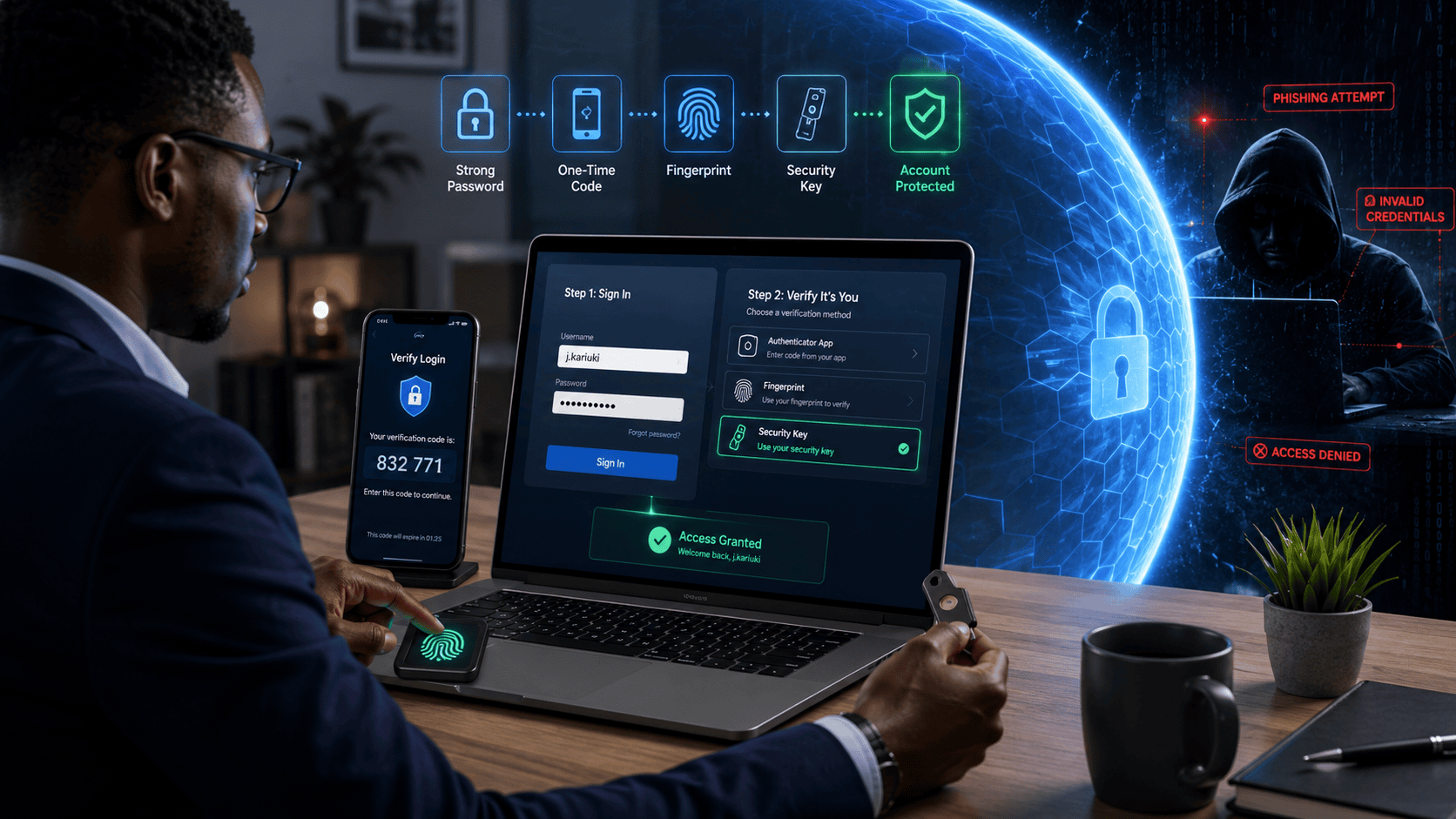
Two-Factor Authentication, or 2FA, requires two different categories of evidence before granting access.
The three traditional authentication factors are:
Something you know: a password or PIN.
Something you have: a smartphone, authenticator app, security key or other registered device.
Something you are: a fingerprint, face or another biometric characteristic.
Logging in with a password and then entering a code generated by an authenticator app is 2FA because it combines knowledge and possession.
Entering two different passwords is not 2FA because both belong to the same category.
Multi-Factor Authentication, or MFA, is the broader term for authentication using two or more factors. Therefore, every properly implemented 2FA system is MFA, but an MFA system could require more than two factors.
CISA recommends MFA for services including email, financial accounts, social media and online stores, noting that it makes account takeover much harder even when passwords have been compromised.
The typical process looks like this:
Username → Password → Second verification → Account access
The second verification could be an SMS code, authenticator-generated code, fingerprint, push approval or physical security key.
Authenticator apps such as Google Authenticator and Microsoft Authenticator commonly use Time-based One-Time Passwords, or TOTP. During setup, the user may scan a QR code containing the information needed to establish the authenticator. The app then generates short-lived codes, often without requiring mobile network coverage.
Not All 2FA Methods Are Equally Secure
SMS OTP is familiar and accessible, but it has important weaknesses. Attackers can use social engineering to perform a SIM swap, moving a victim’s phone number to another SIM and potentially intercepting text messages. Telecom-network attacks can also threaten SMS authentication.
Authenticator apps are generally stronger because the code is generated locally rather than delivered through the mobile network. However, the code can still be stolen by a convincing phishing site.
NIST specifically says manually entered OTP authentication is not phishing-resistant because an attacker can trick a victim into entering a valid code and relay it to the legitimate service in real time.
Push notifications can be convenient, but attackers sometimes use MFA fatigue or push bombing: repeatedly sending login requests until a frustrated user accepts one. Number matching, where the user must match a number displayed during the legitimate login, makes this safer.
Email codes are useful as an additional check but are weaker when access to the email account depends on the same compromised credentials or device.
Biometrics can provide strong authentication, especially when used locally to unlock a trusted device or cryptographic credential. Your fingerprint itself should not need to be sent to the website.
The strongest widely available options are FIDO security keys and passkeys.
Hardware devices such as YubiKey and Google’s Titan Security Key use cryptographic authentication rather than asking the user to copy a code. CISA describes FIDO/WebAuthn as the widely available phishing-resistant authentication organisations should work towards.
Passkeys take this further.
A passkey replaces a password with a cryptographic key pair. The website receives a public key while the private credential remains under the user’s control. The login is approved through the device’s PIN, fingerprint, facial recognition or another local unlock mechanism.
Passkeys are based on FIDO2 technology, including WebAuthn and CTAP, and are bound to the legitimate website. This makes them resistant to conventional credential phishing because a fake website cannot simply collect a reusable password or OTP.
Google offers passkeys for Google Accounts, Microsoft supports them for consumer accounts, and Apple integrates passkeys across its devices. GitHub allows passkeys to satisfy both password and 2FA requirements during login.
This does not mean traditional 2FA disappears tomorrow. SMS and authenticator apps remain important where passkeys and security keys are not available.
It also does not make accounts impossible to hack. Criminals can attack account-recovery systems, steal active session cookies, compromise devices or manipulate users into approving requests. Strong authentication reduces risk; it does not eliminate the need for secure devices and good security practices.
Why 2FA Matters Across Africa
The issue is particularly important across Africa as banking, mobile money, government services, e-commerce and business operations increasingly move online.
Nigeria’s Central Bank has required stronger authentication across parts of the financial system for years. Its payments security framework states that a minimum of two-factor authentication should apply to mobile-money transactions. In March 2026, new instant-payment rules also required MFA to protect customers changing instant-transfer preferences.
Flutterwave made 2FA mandatory for account login in 2023, allowing authentication through an authenticator app or OTP delivered through registered channels.
Moniepoint uses MFA that can include device biometrics and Time-based One-Time Passwords. Its current guidance requires MFA for specified higher-value transfers and supports Google Authenticator where biometric authentication is unavailable.
Traditional banks have similar layers. FirstBank’s FirstToken generates short-lived transaction codes, while GTBank’s eToken generates six-digit OTPs for electronic transactions. Access Bank describes its corporate banking security as using passwords with OTP or token-based multi-factor authentication.
PalmPay says it uses biometric and facial verification as additional authentication layers, while OPay warns customers not to reveal passwords, PINs or token-generated codes and provides rapid account-locking mechanisms for stolen phones.
Safaricom’s M-PESA business access systems similarly recognise PINs, passwords, OTPs and additional authentication methods as security credentials. The importance of protecting mobile identities is particularly clear because SIM-swap fraud can threaten systems that rely heavily on phone numbers.
The same principle extends beyond banking. A compromised Microsoft 365 or Google Workspace account could expose company files. A hijacked social media account could be used for impersonation scams. A stolen developer account could expose software repositories.
GitHub now requires 2FA for contributors on GitHub.com and recommends stronger methods such as TOTP, passkeys and security keys rather than relying solely on SMS. LinkedIn recommends authenticator apps over SMS for its two-factor authentication.
How to Protect Your Accounts Properly
Start with your most valuable accounts: email, banking, mobile money, password manager, cloud storage, social media and business systems.
Open the account’s Security, Sign-in or Password and Security settings and enable 2FA or MFA. Where several options exist, a practical security order is:
Passkey or FIDO security key → Authenticator app → Number-matching push authentication → SMS OTP → Email code
The exact choice depends on the service and your circumstances, but organisations handling sensitive information should aim for phishing-resistant authentication.
Store recovery codes somewhere secure. Register a backup security key where possible. Losing the only authentication device without a recovery method can lock the legitimate owner out as effectively as it blocks an attacker.
Never give an OTP to someone who calls or messages claiming to represent your bank. Do not approve a push notification you did not initiate. An unexpected authentication request can mean somebody already knows your password.
Use a password manager to create a different strong password for every service that still requires one. This limits credential stuffing when another website suffers a breach.
For businesses, 2FA should be part of a wider identity strategy. Require MFA for employees, remote access, cloud applications and administrators. Centralised enterprise identity management can enforce access policies, revoke accounts when workers leave and apply different controls to high-risk users.
That fits the Zero Trust principle: access should not be trusted merely because someone knows a password or is already inside the company network. Passwords are not disappearing immediately, but authentication is moving beyond them.
The safest future is not a longer password followed by another password. It is authentication built around cryptographic credentials, trusted devices and human verification that attackers cannot easily copy.
Turning on 2FA today remains one of the easiest improvements most people can make. Choosing phishing-resistant authentication where available makes it considerably stronger.
Don’t miss important articles during the week. Subscribe to Techbuild weekly digest for updates