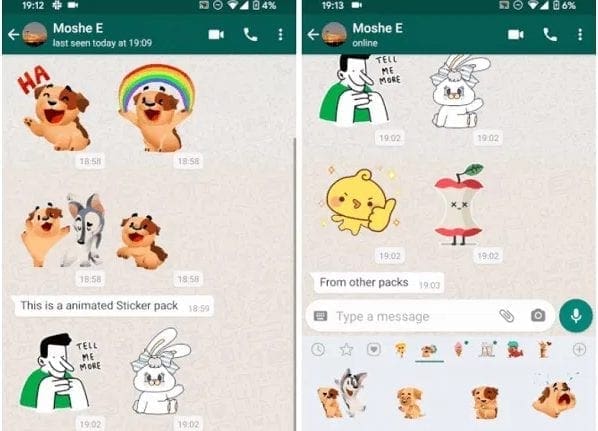
WhatsApp has commenced the release of its animated stickers for iOS, Android and desktop users.
This announcement was made on its Twitter handle
These features can now be found along with the regular sticker present in the in-app Sticker Store.
Next to these animated stickers packs can be found the play button which distinguishes them from the regular ones.
Some of the new stickers rolled out on Android and iOS WhatsApp include Moody Foodies, Bright Days and Chummy Chum Chums.
WhatsApp version app on Desktop is also not left out of the newly rolled out sticker features.
To view the new sticker packs on the instant messaging app, make sure that your WhatsApp is the latest version.
This newly released feature will work on the messaging app for Android v2.20194.16 and iOS v2.20.70.
Once you are done updating to the latest version, click through to open a chat, move to the bottom of the chat where you will click on the emoji icon where the sticker section is.
You can take these steps to add the new animated stickers to your WhatsApp:
- Click on the emoji icon found at the bottom bar of your WhatsApp chat
- At the end of the screen, select the sticker option and click on the ‘+’ icon found on the right side of the stickers section
- You will now see the Stickers Store in the App with lists of stickers packs
- You will see the new stickers added to the “All Stickers”
- Click and preview on the sticker before you download by tapping them
- The pack now appears on the Stickers section which you can use in your subsequent chats
By default, the animated stickers play on their own just once and stop, however, users would have to scroll through to trigger the animation of the stickers.
On WhatsApp for Desktop, users cant download the stickers, however, once these stickers are downloaded on the mobile version, it automatically gets displayed on the Desktop app.
As of now, WhatsApp is not supporting third-party stickers as it wasn’t available on Google Play store.
Featured Image: tellforceblog
Don’t miss important articles during the week. Subscribe to cfamedia weekly digest for updates.