


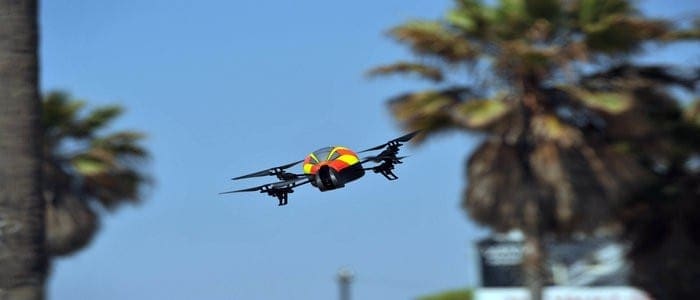
Ever wanted to own your personal drone? Well, good luck; we live in a world of possibilities, and you could easily acquire a Parrot AR Drone. This is the 2.0 Power Edition; it is fun and downright impressive.
The Package
The AR Drone is decently packed in a way to make you even more anxious to unwrap the mysteries contained in the box. It contains two batteries and a small charger that plugs into the wall socket.
The package has two hulls from which one could choose from. The first hull is specially designed for use when indoors. It has shield-like protection that prevents the rotors from causing damage in your space. The other hull is for outdoor flying and is devoid of the rotor-shields.
The rotors come in various colors. The manufacturers offer three color choices, and the rotors can be customized further through decorative stickers.
Flying the Drone
 The two batteries offer a flying time of slightly over an hour and have to be swapped at an interval of about 35 minutes. The AR Drone effectively creates a wireless network to connect with the control device. An app for Android and iOS devices is also available. Through the app, one receives a live video feed for the drone’s front-mounted camera.
The default control setup allows the drone to be steered by tilt. pressing and holding an icon on your phone, iPad or tablet, allows you to use the device as a joystick that controls the drone. You can alternatively acquire a joypad and use it to steer the drone. The joypad is easier to use especially for first tie users.
The Camera
The front-mounted camera offers a decent real-time video view of the flight. The picture is, nonetheless, soft. It gives quite an interesting account of the flight. The videos can also be stored on an external storage device using the built-in USB port on the drone. The quality of the photos that you can take is quite satisfactory; though, at 1280 X 720, they are rather small. The pictures you capture are sent to your phone’s or tablet’s memory.
A second camera at the base of the drone allows for easy landing on a target.
The App
Configuring the app is easy, and the auto-stabilization on the AR Drone makes the control smooth and fluid. The app can additionally restrict maximum flying height, speed and tilt angle.
Performance
It is fun flying this drone. Once you master the controls, you can even do awesome flips and have tons of fun flying around the neighborhood at incredible heights and speeds.
The Wi-Fi range, however, is quite disappointing and sometimes one loses the drone’s connection with the phone even when it is within clear sight. This can, however, be circumvented by using 3G connection with the drone since it affords unlimited connectivity.




