


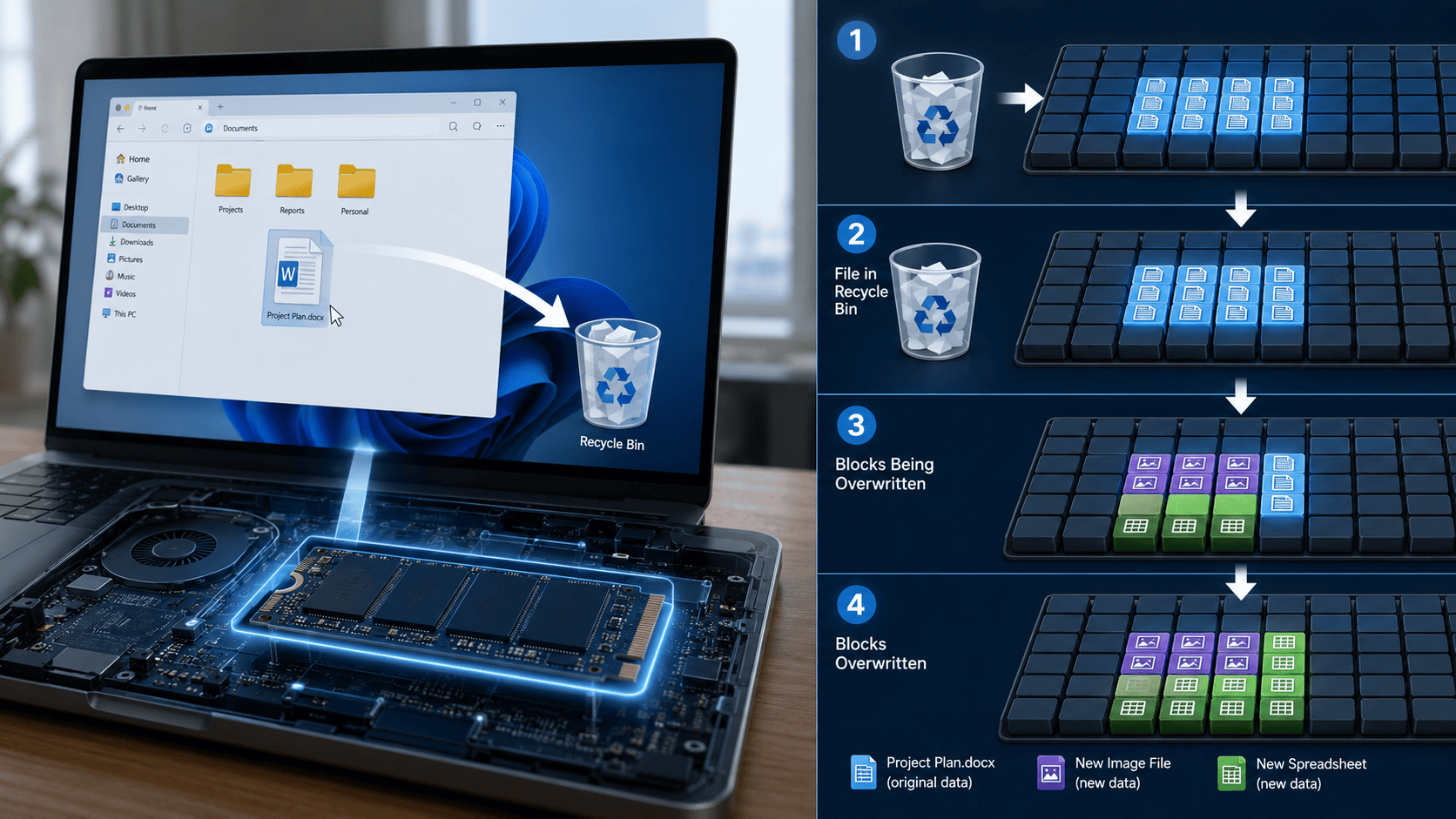
What happens to your deleted file? Most people assume that pressing Delete instantly destroys the document, photograph or video. In many cases, almost the opposite happens: the computer stops showing you the file but may leave its actual data on the storage device until something else replaces it.
Think of a storage drive like a library. The file system is the catalogue telling the computer where every book is kept. Deleting a file often removes or changes the catalogue entry and tells the system that the shelf can be reused. The book may still be sitting there.
That simple distinction explains why accidentally deleted photographs can sometimes be recovered, why formatting a memory card does not always destroy everything and why organisations should never assume that deleting files is enough before selling a computer.
A file system manages how information is organised on storage. Windows commonly uses NTFS, removable drives often use FAT32 or exFAT, Apple devices use APFS, while Linux systems frequently use ext4.
These file systems store metadata: information describing a file rather than the file’s visible contents. Metadata may include its name, size, location, timestamps and permissions. Microsoft explains that NTFS maintains a Master File Table containing entries for files and information about where their data is stored. When an NTFS file is deleted, its MFT entry can be marked free and later reused.
That is why deletion can happen almost instantly even when the file is several gigabytes. The computer usually does not need to immediately overwrite every byte. It simply changes its records.
What Actually Happens After You Press Delete?
On Windows, a normal Delete operation usually sends eligible files to the Recycle Bin. On macOS, deleted files can move to Trash. At this stage, the file is not truly gone from the user’s point of view. The operating system has essentially relocated it so that it can be restored.
Apple notes that storage occupied by a file moved to Trash does not become available until the Trash is emptied.
Windows offers a similar safety layer through the Recycle Bin. A user can normally restore an accidentally deleted item before the bin is emptied.
Using Shift + Delete in Windows bypasses the normal Recycle Bin workflow. Emptying the Recycle Bin or Trash also removes this convenient recovery route.
But “permanently deleted” in an operating-system interface and “physically destroyed on the storage medium” are not always the same thing.
After deletion, a traditional file system may mark the clusters, sectors or blocks previously associated with the file as available. Until new information occupies those locations, some or all of the old data may remain. Recovery software exploits this window.
Some tools reconstruct files using remaining file-system metadata. Others use a technique called file carving, searching storage directly for recognisable patterns belonging to JPEG images, PDFs, ZIP files and other formats even when the original filename and folder information are gone.
This is also why the first rule after accidentally deleting an important file is simple: stop writing new data to that storage device. Downloading recovery software onto the same drive, installing applications or continuing to take photographs on the affected memory card can overwrite the very data you are trying to recover.
Formatting creates a similar misconception. A quick format commonly recreates or resets file-system structures without necessarily overwriting every storage location. Depending on the device, format method and subsequent use, forensic or recovery tools may still find data.
A full overwrite or purpose-built sanitisation process is different. The details also depend heavily on the storage technology.
HDD vs SSD: Why Deleted Files Behave Differently
A traditional hard disk drive stores information magnetically on spinning platters. Files occupy physical sectors on those platters.
When a file is deleted, the magnetic information in its old sectors may remain until another file overwrites them. This makes recovery from an HDD relatively possible when deletion was recent and the disk has seen little additional activity.
If the old sectors have been overwritten with new data, recovery becomes dramatically more difficult because the original information is no longer available through normal means.
SSDs complicate the picture. Solid-state drives store information in NAND flash memory. They work with pages and larger blocks and use technologies such as wear levelling and garbage collection to manage storage efficiently.
Unlike an HDD, an SSD generally cannot simply overwrite an occupied flash page in place. Old blocks must eventually be erased before being reused.
This is where TRIM becomes important. When you delete a file, an operating system that supports TRIM can tell the SSD that particular areas no longer contain useful user data. The SSD controller can then treat those pages as invalid and reclaim them during its internal garbage-collection process.
Kingston explains that TRIM allows the operating system to notify an SSD that data has been deleted so that previously occupied blocks can eventually be freed. Windows calls this mechanism a file-delete notification, or TRIM/unmap. Microsoft documents TRIM support in modern NTFS environments.
This has an important consequence: recovering a deleted file from an SSD can be much less predictable than recovering one from an HDD.
TRIM itself does not necessarily mean the physical cells are erased at the exact moment you click Delete. The SSD decides when garbage collection occurs. Kingston notes that data persistence following TRIM can depend on the controller and its garbage-collection implementation.
However, once the relevant flash blocks have been erased internally, traditional file recovery becomes ineffective. Phones increasingly resemble SSDs in this respect. They use flash storage, encryption and application-specific deletion systems.
On iPhone and iPad, files deleted through Apple’s Files app normally remain in Recently Deleted for 30 days. Removing them from Recently Deleted deletes them immediately from that recovery location.
Android behaviour depends partly on the app. Files by Google keeps items moved to its Trash for 30 days before automatically deleting them, although some cleaning operations permanently remove files instead of sending them there.
Modern mobile devices also rely heavily on encryption. Apple explains that its device-erasure process can destroy encryption keys, making user data cryptographically inaccessible rather than laboriously overwriting every flash cell. That is one reason factory-reset procedures designed by the manufacturer are preferable when selling a modern smartphone.
Read also: Tech Trends: Tips On How To Recover Deleted Files
What Happens in Google Drive, OneDrive and the Cloud?
Deleting a cloud file is different because the physical storage is controlled by the service provider.
Google Drive moves deleted files to Trash, where they normally remain for 30 days. After that, or after the user empties Trash, the file is treated as permanently deleted from the service.
OneDrive personal accounts normally keep deleted items in the OneDrive Recycle Bin for 30 days. Work and school accounts generally retain them for 93 days unless an administrator changes the setting.
Dropbox takes a plan-dependent approach. Its current recovery windows range from 30 days on some consumer plans to as much as 365 days on certain business plans. Dropbox says that after the applicable period, deleted files are marked for permanent deletion from its storage systems.
iCloud Drive allows deleted files to be recovered for up to 30 days. Removing them permanently or allowing the recovery period to expire removes that recovery option. Deleting an iCloud Drive file can also synchronise the deletion across devices signed in to the same account. This highlights an important distinction between syncing and backup.
If your laptop folder is synchronised with cloud storage and you delete a file, the deletion itself may sync to the cloud. Cloud recycle bins and version histories can save you, but a proper independent backup remains important.
Organisations may also have separate retention, compliance or backup systems, meaning that deleting a file from an employee’s normal view does not necessarily erase every retained copy immediately.
When Is a File Truly Gone?
For everyday users, a deleted file becomes practically gone when no accessible backup or recycle-bin copy remains and the original storage has been overwritten, internally erased or rendered cryptographically inaccessible.
For organisations handling sensitive information, “practically gone” is not a strong enough standard.
NIST’s current media-sanitisation guidance defines sanitisation as making access to target data infeasible for an appropriate level of effort. Its 2025 revision emphasises three broad approaches through recognised standards and organisational procedures: clearing data, purging it more comprehensively, or destroying the media when necessary. It also identifies cryptographic erase as an important technique for encrypted storage.
For HDDs, overwriting user-addressable storage remains useful in suitable circumstances. Seagate documents full zero-fill processes that write across the drive’s data sectors.
SSDs should be treated differently. Wear levelling means repeatedly writing zeros like you might on an HDD does not guarantee that every old flash cell was overwritten. It also creates unnecessary wear.
Purpose-built SSD sanitisation or secure-erase commands are more appropriate. Samsung describes Secure Erase as a process intended to remove data from SSD cells, while Kingston recommends device-supported secure erase rather than repeated overwrite passes for flash storage.
Encryption provides another powerful option. If a drive has been properly encrypted from the beginning, destroying the necessary encryption keys can make the remaining encrypted information useless. This is called cryptographic erase. The important point is that formatting is not the same as sanitising.
For example, a company preparing old computers for resale should not simply right-click a disk, format it and assume every customer document has vanished. Seagate warns that ordinary deletion or formatting can leave information in areas that require stronger sanitisation techniques. That matters increasingly across Africa.
Banks store identity and transaction information. Hospitals hold medical records. Government agencies manage citizen databases. Universities keep student information. Journalists may have confidential source material, while startups routinely store customer identification documents, financial information and intellectual property.
An improperly erased laptop, USB drive or office hard disk leaving one of these organisations can become a data breach without any hacker breaking into a network. The same applies to individuals selling old smartphones and laptops.
Before disposing of a device, first make a verified backup of anything important. Sign out of accounts where required, remove external memory cards and use the manufacturer’s recognised factory-reset or sanitisation process. Apple, for example, instructs users preparing an iPhone for another owner to use Erase All Content and Settings.
For organisations, secure disposal should form part of a documented data-lifecycle policy rather than depending on individual employees remembering to delete folders.
Digital forensic investigators approach the issue from the opposite direction. When legally authorised to examine a device, they may preserve the storage, create forensic copies and examine remaining file-system metadata, unallocated space, backups, logs and other artefacts.
This means a file disappearing from your desktop is only one stage in a much larger storage process.
The simplest way to remember it is this: Delete usually removes access first. Overwriting, sanitisation or cryptographic erasure removes recoverability.
So when an important file disappears accidentally, act quickly and stop using the affected storage. When sensitive data needs to disappear permanently, do not rely on Delete alone.
Don’t miss important articles during the week. Subscribe to Techbuild weekly digest for updates